The Engine We Lost: Digital Archaeology of Opera Presto
The New IndexedDB and the Old VEGA
Contents
This week’s archaeology is coming out far shorter than it ought to be. I simply do not have the energy to pull together all the notes I take as I go. I will admit it: I am badly overloaded.
So here it is as it stands—I may expand parts of it later.
XXXVI. IndexedDB Is in Place
The subsystem design, worked out down to the last detail in the previous part, has turned into code. Event ordering, transaction lifetimes, JavaScript object conversion, file handling, quotas, private mode, workers—it is all there now, or at least it all passes the tests. As decided, IndexedDB runs on top of SQLite. Which raises a question: doesn’t SQLite already support at least some of the above? Transactions, for one, exist on both sides.
It would be nice, but that is not how it works. SQLite and IndexedDB relate to each other roughly the way a file system relates to a mail client. The client can keep every message in its own file, but it still has to keep track of threads and unread counts itself. In the same way, SQLite guarantees the integrity of the data, while the browser owns the rules by which that data exists.
The simplest example is sorting. You would think SQLite has this covered—it sorts numbers, it sorts text, it even has opinions about ordering values of mixed types.
But IndexedDB has an order of its own: Number < Date < String < Binary < Array. And if that were not enough, there are nested arrays, binary keys, UTF-16 strings, infinities, canonicalization of -0, a ban on NaN, and special comparison rules. None of it is especially hard to implement, but it does show how differently the two think.
XXXVI.I IndexedDB on Its Own Thread
Presto’s core is mostly single-threaded. JavaScript, the DOM, events, documents, and the bulk of the browser logic all live on the main thread. Run a heavy SQL query, a file sync, or a journal recovery there, and the whole of Opera stops along with the database. Opera’s developers had already hit this while implementing WebSQL, and they had to write a patch for SQLite that let operations be interrupted. That makes it possible to break heavy queries into pieces—a reasonable trade of effort for result, though it has its downsides too. The patch has to be carried forward carefully on every SQLite update, it does not guarantee responsiveness, it still burns main-thread resources, and keeping it under control means writing some sort of state machine. Even so, that road was open.
The other option was to build the simplest possible implementation inside the main thread and move it onto multithreaded rails later. That would have been an order of magnitude faster and easier right now, but the eventual move would have meant redesigning cancellation, shutdown, memory ownership, and nearly every transaction state from scratch—and believe me, I would rather not go back over ground I have already covered.
So IndexedDB got a thread of its own:
Main thread: JavaScript → request validation and preparation
                                  │
                              job queue
                                  ↓
IndexedDB thread: database operations → SQLite → disk
                                  │
                          completion queue
                                  ↓
Main thread: object reconstruction → events for the page
Preparing a request stays on the main thread. Reading a property of the object being stored can call a function the page wrote; asking for more space can put a dialog on screen. This is also where permissions are checked, transactions are scheduled, and the binary representation of the data is built. An IDB_Job object is allocated on the heap, and a pointer to it goes into the job queue.
Memory inside the process is shared, so only the pointer travels: the IndexedDB thread takes a job off the queue, runs it, and—having written its bookkeeping data—hands the reference back the same way through a second queue. Large, multi-step answers can be delivered in pieces, and the receiver on the main thread assembles the chain of partial replies into a whole.
The threading itself is entirely conventional: CreateThread() on Windows and PosixThread::CreateThread() on Linux, with a new OpWorkerThread abstraction settling in next to the existing OpPseudoThread (which we will have to come back to). That abstraction will be far easier to swap for a cross-process one, if we ever get that far.
XXXVI.II Finalizing the Transaction
The IndexedDB specification looks insane in places. Here is a simple example: imagine a page reads a large Blob out of IndexedDB, keeps a reference to it, and then deletes the original record. The data has to stay readable for as long as the JavaScript object is alive. On top of that, you can delete the entire object store, close the connection, delete the named database, and create a new one under the same name right away—and the old Blob is still required to read back, and has no right to quietly attach itself to the new database. Funnier still: a Blob can become visible to JavaScript before the transaction is physically committed. If that transaction then rolls back, the object already handed out still must not turn into an empty shell.
Fun, isn’t it? Somehow I don’t see anyone smiling.
There is plenty more of this, and at times it was completely unclear how to do any of it at all. But I had the Firefox and Chromium implementations in front of me—they had to solve the same problems. Better still: I could start straight at IndexedDB 3.0 and skip supporting the earlier specifications.
What came out is certainly no better than Firefox’s and no faster than Chrome’s. Their engines have years of profiling behind them, huge teams, and a multi-process architecture Presto does not have yet. Chrome uses LevelDB and will win on many typical key-value workloads. Firefox can serve databases in parallel and has a full background QuotaManager infrastructure. Me, I am glad my implementation at least does not drag.
While fact-checking this, I discovered that Chrome is also moving IndexedDB onto SQLite. I don’t quite know what to say about that, but it is an interesting fact.
One last thing: an IndexedDB inspector has been added to Dragonfly. It required extending the scope protocol, but that story is out of scope here.
XXXVII. Digging into VEGA
This one is my own fault. I set out to fix one tiny bug, one loose floorboard—and ended up rebuilding a whole floor.
As usual, I will start from a distance.
A page is made of text, images, curves, fills, and semi-transparent layers. The browser’s interface is made of much the same: the address bar, the tabs, the menus. In Opera, drawing both converges on one library. Quick, which owns the interface, and the document display code both go through a shared painter built on top of VEGA. A fix at that level can touch the page and the window around it at the same time.
VEGA itself can compute geometry, turn it into pixels, composite images, and apply effects. It has several backends for that:
Page, SVG, canvas, Opera's interface
                  │
                 VEGA
                  ├─ software rasterizer → pixels in main memory
                  │
                  └─ 3D backend → shared graphics device interface
                                      ├─ Direct3D 10.1
                                      └─ OpenGL
The sources also preserve a 2D hardware backend built on DirectFB. It is never enabled in desktop builds,was probably used on devices where it was the only available option.
The subsystem is initialized at program startup, and there is no switching between backends at runtime.
Judging by the interfaces, the engineers expected to carry the library from device to device, keeping the shared drawing code and swapping out its lower, platform-specific layer. Opera’s plans at the time covered computers, phones, and televisions—lead graphics developer Tim Johansson said as much in the 2011 WebGL announcement, for one. An architecture like that could adapt to whatever the next platform could do, and to whatever it could not.
XXXVII.I A Problem of Scale
I use several monitors with different pixel densities and different scale factors. The old Opera looked worse on them than it could have, but that much you can live with. At fractional scales—125%, 150%, and the like—there was trouble at the window’s edges as well. Coordinates could drift by a literal pixel, and a click on the browser’s border sometimes registered as a click outside it.
Windows knows how to help applications that know nothing about high pixel density: they draw their window at the resolution they expect, and the system scales the finished picture up. The size comes out right, but text and fine detail can blur.
To get a sharp image, a program has to draw at the target resolution itself. To do that it declares itself DPI-aware, and Windows stops scaling its window. Setting that flag in the manifest is easy; from there the application has to handle the scale on its own. In Opera, with its own interface, almost all of that work lands on the graphics subsystem. Microsoft’s write-up of the mechanism.
Luckily, the code turned out to contain TWEAK_DISPLAY_PIXEL_SCALE_RENDERING. Behind it sit a coordinate transformer, a scalable painter, and a way to query the scale of a window’s surface. The engineers had already done a good part of the work needed, but once again the code turned out not to be entirely finished. And I understand them—scaling is hard.
To make it concrete, take a button a hundred logical pixels wide. At 150% it should occupy a hundred and fifty pixels of the surface. The button’s code still asks for a rectangle a hundred wide; the painter performs the conversion. Mouse coordinates arriving from the system run through the inverse conversion, so that hit testing works in the same units.
Then comes the nuisance every large project knows: almost everywhere it all adds up, and in one place something was forgotten. Window sizes, image clipping, menus, dragging, the cursor—every participant has to use the right coordinates. Otherwise a menu opens offset, or a click lands somewhere other than where the button is drawn.
On top of that, there is no such thing as one and a half pixels in a raster buffer. For a surface, the boundary has to be rounded outward so as not to leave a strip along the edge. A saved window position has to be recomputed so that it neither creeps nor grows after several conversions back and forth. At 200% many errors of this kind go unnoticed; at 125% they show up at once.
XXXVII.II Letters, Monitors, and Scrolling
On Windows, DPI-aware mode is set before the first window is created. Which means the setting behind it has to be read even before Opera’s ordinary settings collections are initialized. The system functions involved are loaded with an availability check, so that older versions of Windows keep working at least somehow.
Each window then receives its own scale and passes it down to the graphics layer. When a window moves between monitors, Windows sends a notification and recommends new dimensions. Order matters here: switch the painter’s scale first, then change the geometry and repaint the contents. Even if the logical size stayed the same, there may now be more physical pixels.
There is no way around scaling fonts either—text has a life and rules all its own. To lay text out into lines, the browser needs to know the size of the letters. Simply swapping in a larger font also buys you different line breaks and text that no longer lines up with the selection, so it has to be done properly. Honestly, this piece of code is nailed down with brute force for now—Opera’s font renderer still needs a closer look.
Scrolling has not come out the way I wanted either, so far. The old code shifted the rectangle it had already drawn and painted in the strip that came free—a good optimization on repeat drawing. But under scaling, physical pixels were being moved by a distance computed in logical ones. So at any scale other than 100% that path is switched off for now, and the scrollable area is repainted in full.
On Linux the shared code is the same, and the scale comes from the X11 session’s settings, Xft.dpi among them. For now it is a single value, chosen at startup. There is no dynamic switching between monitors at different scales here yet, the way there is on Windows.
On the whole, scaling looks like it works, but it is still rough in places. Even setting the code’s problems aside, there are the skins—their graphics are raster, and they look bad stretched.
I have a feeling I will be coming back here more than once.
XXXVII.III The Return of Hardware Acceleration
This is where I gave in to the temptation to look at how hardware acceleration was implemented—and got stuck there for a long while.
Working code sat side by side with half-finished code, debug wrappers, and buggy counters. The hardware “blocklist” mechanism is either broken or simply unfinished: it never once allowed interface acceleration through OpenGL on Windows, citing internal benchmarks. WebGL is there, but as an experimental feature implemented to an unclear degree.
So far this is the least polished code I have found, which is no surprise—hardware acceleration was Opera’s newest subsystem, and it never had time to settle. But its architecture is interesting.
VEGA’s hardware backend turns operations into vertices, triangles, and textures; shader programs compute the result of drawing them. Compatible operations are gathered into batches. Rectangles sharing one texture and the same settings, for example, can be drawn together, saving on device setup and on individual calls. But operations have to be merged with an eye on ordering: two overlapping semi-transparent objects will produce a different picture if you swap them. Sometimes the surface has to change, a filter has to be applied, or a texture already in the queue has to be updated. The accumulated work then has to be submitted early, and the batches come out smaller—and the renderer accounts for all of it.
Part of the preparation runs on the CPU; for some operations it computes masks. Fonts are served through different paths too: the Windows Direct3D backend uses DirectWrite and Direct2D. The upshot is that behind a drawing call that looks simple stands a pipeline with its own resource accounting, queues, and synchronization.
And sometimes it all has to be sent back. A page can ask for the bytes of a canvas that has already been drawn: now you have to wait for the video card and read the result into main memory. Alternate drawing with reads like that often enough, and moving the data around can eat the gains from acceleration.
VEGA’s software rasterizer is in a good position here—the pixels are already sitting in main memory. It is quite well built in general: it processes the image scanline by scanline and is frugal with memory. There are dedicated SIMD optimizations too, though their switch is turned off—another thing still to sort out.
Does what is there work?
Yes. Technically the picture comes out, and acceleration is applied for WebGL. But the system is fairly raw, performance swings from one scenario to the next, and in most cases the plain software path turns out to be faster. Many features are missing, and the ones that are there are dated. The implementation is far from finished, but the subsystem’s design is genuinely mature.
I started with what looked like a trifle: the compatibility lists. Roughly speaking, this is a registry of entries telling the browser which hardware-acceleration scenarios are allowed on the current hardware. Chrome and Firefox both have mechanisms like it; Opera tried to build one too, and the rawness is visible to the naked eye—the rules literally contain typos.
Given that this list is a decade and a half out of date, it is of no use now. The result: the “blocklist” mechanism itself has been kept, but it no longer tries to update itself from Opera’s long-dead servers, and the user is allowed to ignore the rules entirely.
Then I got the OpenGL and Direct3D backends working again, at the level they were originally built to. Luckily these APIs have almost no shelf life to speak of: DirectX from version 9 onward runs on modern Windows without trouble, and Opera used DX 10. OpenGL barely needs mentioning—even thirty-year-old code will very likely run on current drivers.
For lack of time, I will have to skip the technical detail here. I hope to tell that story later, when I come back with improvements. For now, just a short list of what was done:
- OpenGL is fully unblocked on Windows.
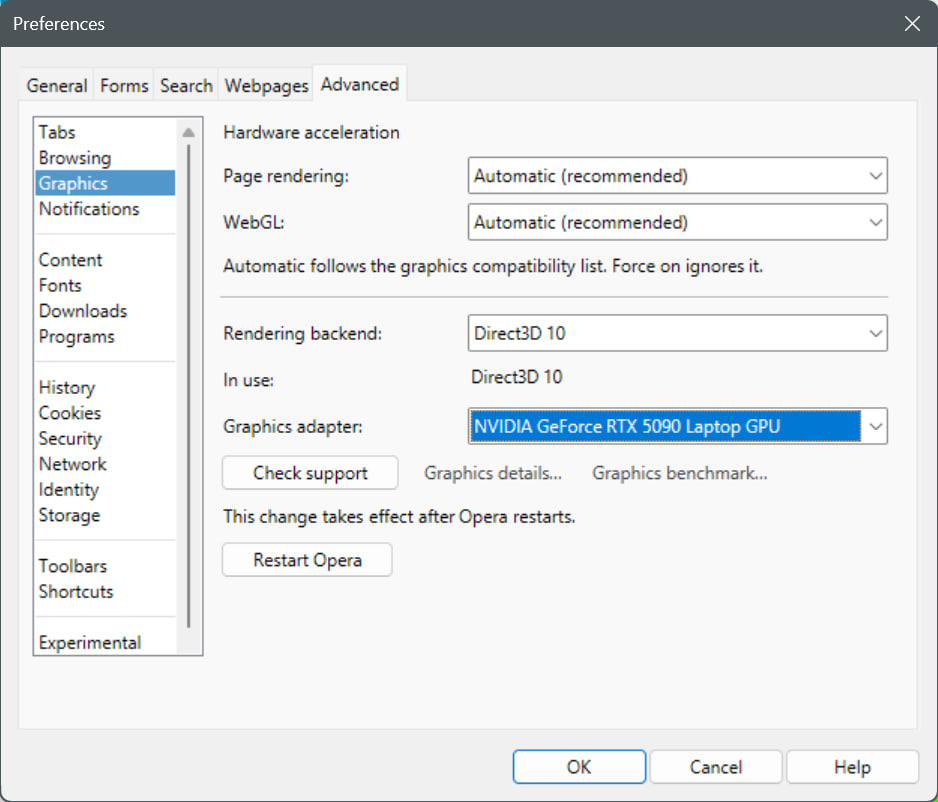
- Acceleration can be turned on and off separately for the browser itself and for WebGL alone.
- The user can now switch the rendering backend between software, OpenGL, and Direct3D 10 (on Windows).
- For Direct3D, the video adapter can be chosen. Now that integrated adapters sit in every machine going, that is worth having.
- Direct3D also supports software emulation through WARP.
- The internal
opera:gpupage has been reworked and shows everything known that relates to hardware acceleration. - WebGL 1.0 has been restored to a minimally working state.
And WebGL is exactly what I want to say a couple of words about.
XXXVII.IV Fixing Up WebGL
No, stop and think about it for a second: hardware-accelerated 3D graphics in a browser. What next? Browsers talking to USB?..
…Hold on, wait a moment.
The first version of WebGL shipped in 2011 and was built on OpenGL ES 2.0—a relatively compact feature set, suitable for mobile devices among others. WebGL 2.0, based on OpenGL ES 3.0, arrived in 2017. Through this API a page hands over geometry, textures, and shader programs. The browser validates the requests and routes them into the graphics subsystem.
In Opera 12 the feature lives under the name experimental-webgl. Some libraries still support that, but Opera’s implementation turned out not to work anyway. It is not broken in any global sense; it failed on an accumulation of small things, some of them bugs, some of them divergences from the specification. Which is odd, given that the standard—developed with Opera’s own participation—appeared slightly earlier than this version of the code. Why it turned out that way, we will never know.
Most of the work went into the shader compiler. Opera has its own, and its job is to take a WebGL shader written in GLSL ES and translate it, depending on the chosen backend, into GLSL (for OpenGL) or HLSL (for Direct3D). Shader validation and translation had to be fixed here, along with operations on matrices, vectors, textures, and so on. Parsing a large shader could overflow the compiler’s stack, because it walked the program’s expression tree recursively; to prevent that, the recursion was replaced with an iterative traversal.
Working around the same problem in Microsoft’s shader compiler—the thing that lives in d3dcompiler_xx.dll—proved harder. It takes the HLSL text handed to it and compiles bytecode for Direct3D. By default the compiler had one megabyte of stack available, which was not enough for parsing long expressions. You cannot reach inside someone else’s library with a fix, so the compiler now runs on a new system thread with a 16 MiB stack reserve. Even that stack may not be enough, so expression complexity is checked, and a potentially heavy shader is rejected.
Along the way, extensions were added for additional texture formats, for saving vertex state, and for drawing the same geometry many times with different parameters. The last one is handy when a scene needs many identical objects, for example: they can all be sent to be drawn in a single call.
The work was verified with the Khronos test suite across every platform and backend, both with real hardware acceleration on NVIDIA/AMD/Intel cards and on the WARP/llvmpipe software renderers.
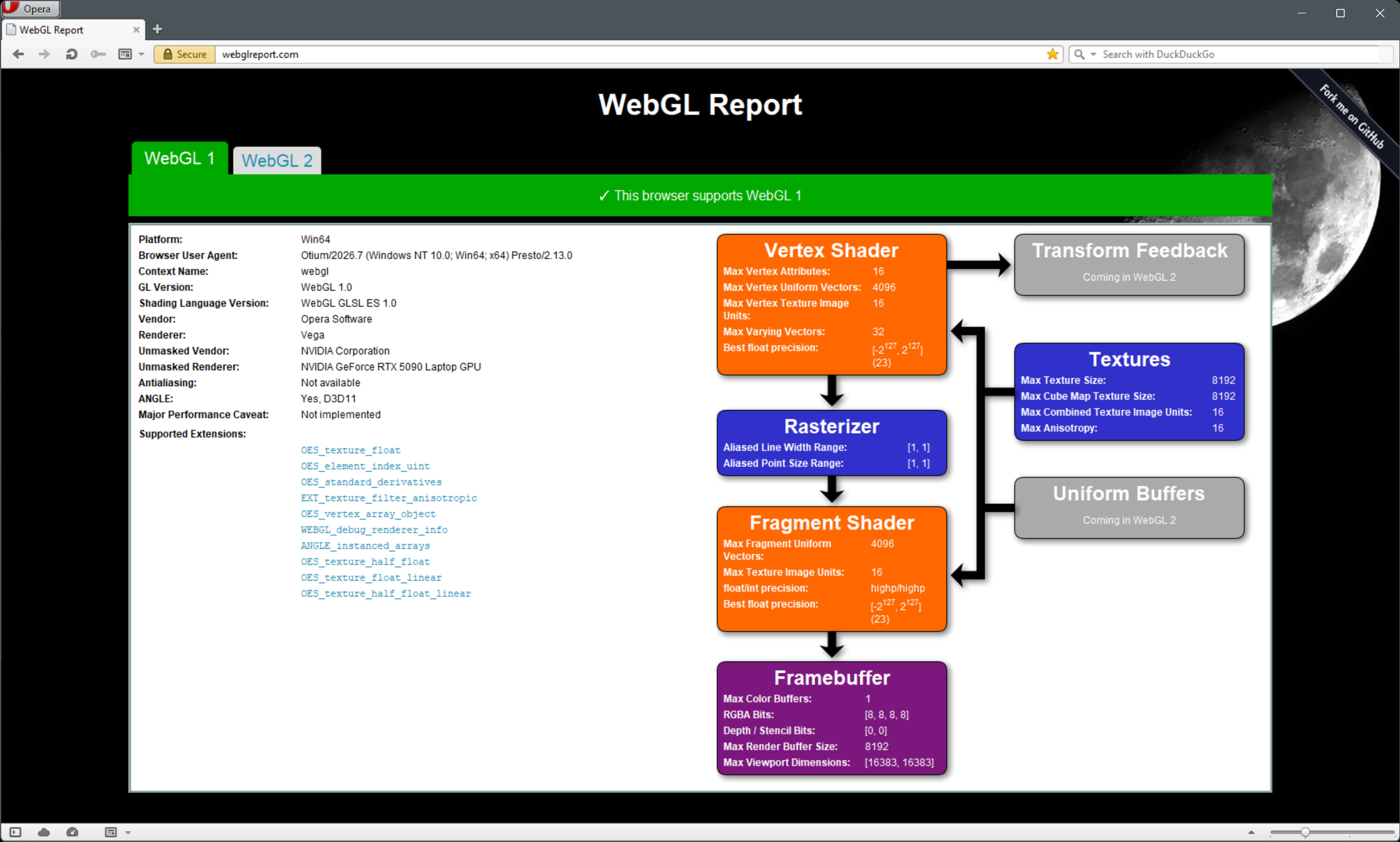
The result is a reasonably working WebGL 1.0 with a few documented gaps that I hope will not be hard to close. WebGL 2.0 can be expected to arrive one day as well; the more modern WebGPU, on the other hand, is an entirely different API that would have to be built from nothing.
XXXVIII. What’s Next?
The improvements above are far from everything that was finished this week. The Streams API has been added, and Fetch can now work in streaming mode. Subresource Integrity and HTML template elements have appeared. The Identity implementation gained a proper editor, so users can configure how the browser identifies itself, either globally or per site.
But the hardest part—honestly, the impossibly hard part—is still ahead. A draft implementation of ECMAScript 2026 is written and under test. I intend to focus on that and nothing else.
The good news: the browser already passes 72,254 of the 81,178 tests in the ES2026 edition. The bad news: a single test262 run on a debug build of Opera takes ~30 hours. Release builds are faster, but catching bugs means running the debug one, and that is honestly wearing me down.